Maintain a High-Quality Shopping Experience with Total Peace of Mind
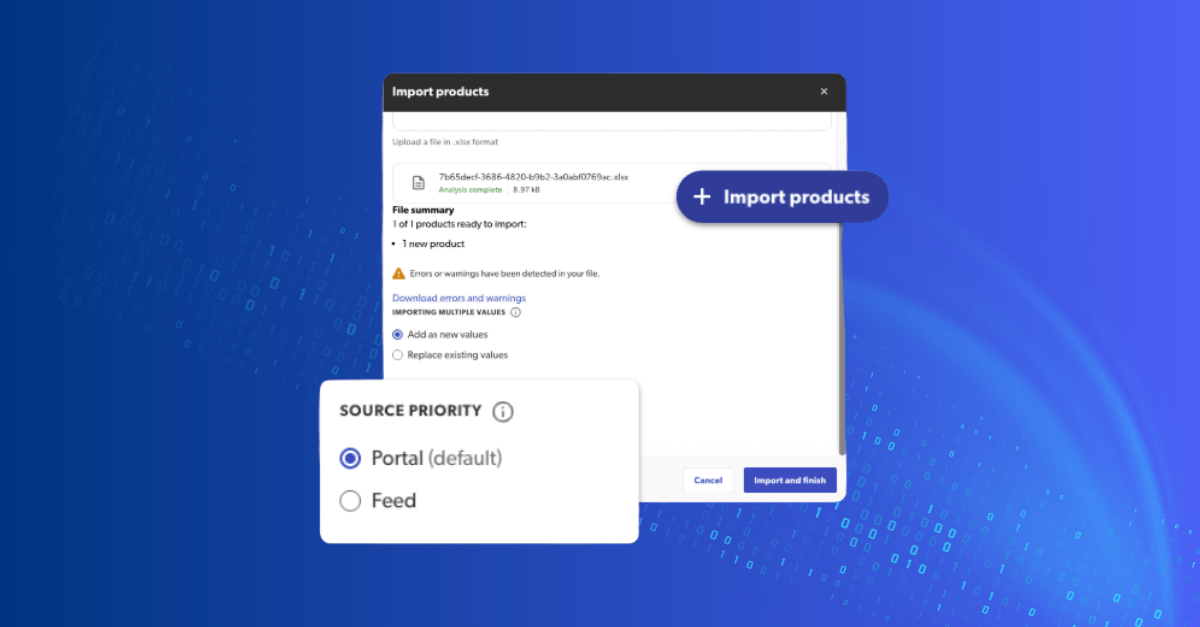
For years, making a quick manual update to your catalog meant permanently “locking” that product out of your automated feed updates. This forced a difficult choice: wait for a weekly feed cycle or risk long-term data discrepancies. Today, we are excited to unlock Agile Catalog Portal Imports—a flexible ingestion system that ensures your manual corrections and automated scale work in perfect harmony.
By bridging the gap between agile, one-off updates and automated data integrity, we are empowering you to move faster without the fear of “breaking” your automation. Whether you are launching a new product or need to make a quick name or description update, Bazaarvoice now gives you total control over your “Source of Truth”.
Key Features to Drive Your Strategy:
- Configurable Source Priority: Use a simple toggle to decide if your manual upload should act as a permanent override or if it should be updated by your next automated feed sync.
- Emergency Speed-to-Market: Bypass your scheduled feed cycles for urgent, small-batch updates to get your products conversion-ready and available across the network.
How to Get Started This feature is automatically available to all users with CATALOG_ADMIN permissions.
- Log in to the Bazaarvoice Portal.
- Navigate to Product Catalog.
- Click Import Products and upload your .xlsx file.
- Under Source Priority, select “Feed” if you want your next automated update to take over, or “Portal” for a permanent override.
Note: If you have previously updated products via the Portal, you may need to request a “source priority reset” to enable these products for future automated feed updates.